
FRM-92095: Oracle JInitiator version too low

FRM-92095: Oracle JInitiator version too low

If we are trying to open old EBS version which has lower JRE, then we might encounter the error.
Solution 1
Add a OS Parameter: JAVA_TOOL_OPTIONS, and parameter value: "-Djava.vendor="Sun Microsystems Inc." as Environment Variables.


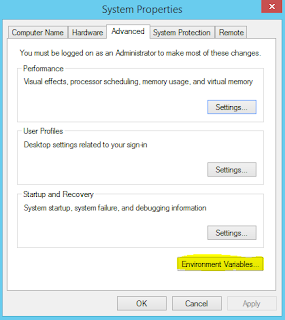
1. Open Advanced system settings
Start Menu › Control Panel › System and Security › System


2. Click Environment Variables:-
Java
3. Add a System variables:-

  • Variable name: JAVA_TOOL_OPTIONS 
  • Variable value: "-Djava.vendor="Sun Microsystems Inc."


parameter


    4.RE-Start your system

    Solution 2

    Add a OS Parameter: JAVA_TOOL_OPTIONS, and parameter value: -Djava.vendor="Sun Microsystems Inc." as Java Runtime Parameter

    1. Open Java Control Panel:-  In the search box enter Java Control Panel
    Click on Java icon to open the Java Control Panel.


    2. After the Java Control Panel opens, go to the Java tab as shown below.


    3. Click "View", then add -Djava.vendor="Sun Microsystems Inc." into the Runtime Parameter box


    Comments

    Popular posts from this blog

    WebLogic migration to OCI using WDT tool

    WebLogic migration to OCI using WDT tool Oracle WebLogic Deploy Tool (WDT) is an open-source project designed to simplify and streamline the management of Oracle WebLogic Server domains. With WDT, you can export configuration and application files from one WebLogic Server domain and import them into another, making it a highly effective tool for tasks like migrating on-premises WebLogic configurations to Oracle Cloud. This blog outlines a detailed step-by-step process for using WDT to migrate WebLogic resources and configurations. Supported WLS versions Why Use WDT for Migration? When moving Oracle WebLogic resources from an on-premises environment to Oracle Cloud (or another WebLogic Server), WDT provides an efficient and reliable approach to: Discover and export domain configurations and application binaries. Create reusable models and archives for deployment in a target domain. Key Pre-Requisites Source System: An Oracle WebLogic Server with pre-configured resources such as: Applica...

    How to Validate TDE Wallet Password in Oracle Database

    How to Validate TDE Wallet Password in Oracle Database Validating the Transparent Data Encryption (TDE) wallet password is crucial, especially when ensuring that the password is correct without using the OPEN or CLOSE commands in the database. This blog post explains a straightforward method to validate the TDE password using the mkstore utility. Steps to Validate TDE Wallet Password Follow these steps to validate the TDE wallet password: Step 1: Copy the Keystore/Wallet File Navigate to your existing TDE wallet directory. Copy only the ewallet.p12 file to a new directory. If a cwallet.sso file exists, do not copy it . The absence of cwallet.sso ensures that the wallet does not use auto-login, forcing the utility to prompt for the password. Step 2: Validate Using mkstore Use the mkstore utility to check the contents of the wallet file. The mkstore utility will prompt you for the TDE wallet password, allowing you to validate its correctness. Command Syntax To display the conten...

    EBS 12.2 ADOP Interview Questions With Scenarios

    EBS 12.2 ADOP Interview Questions With Scenarios Note: Check the patch cycle log is important to fix any issues.  Location: $ADOP_LOG_HOME Useful Adop Commands Click here 1.What is ADOP concept in oracle apps Online patching is the most important new feature in Oracle E-Business Suite Release 12.2. It is the ability to patch a running system without having to take the system down for a significant period of time while the patches are applied. 'adop' is the utility we use to apply patches in R12.2 2.What is PATCH_TOP directory in R12.2 In R12.2 there is a new directory location environment variable called $PATCH_TOP which points to $NE_BASE/EBSapps/patch $NE_BASE points to <Non-Editioned-filesystem-directory> Download the patch into the patch top directory and unzip it. This is the default location where the adop will look for patch files. If you are planning to put patches in non-defualt location then you need to use adop parameter 'patchtop=<patch_path>' to...